How to Use a Stock Screener for Swing Trading
There are approximately 5,500 stocks listed on US exchanges. A trader manually reviewing daily charts at 60 seconds per chart would need 91 hours to scan the full universe once — and by the time they finished, the setups from the first 45 hours would be stale. Knowing which filters matter is only half the problem. The other half is a repeatable workflow that takes you from a raw screener output to a tradeable setup with defined entry, stop, and target.
A 2018 paper by Brad Barber and Terrance Odean found that retail traders who traded most frequently underperformed passive strategies by 6.5% per year — largely because they traded on noise instead of signal. A systematic screening workflow inverts that problem: it filters first, grades the results, and hands you a shortlist ranked by conviction — not a wall of tickers you still need to evaluate manually.
This guide covers the practical workflow: how to choose between strategy-based and raw-filter screening, how to read the grades and tags in a results grid, and how to convert a screener hit into a trade with defined risk. For the research behind each filter, see 5 Swing Trading Screener Filters That Separate Signal from Noise.
The 5 Criteria at a Glance
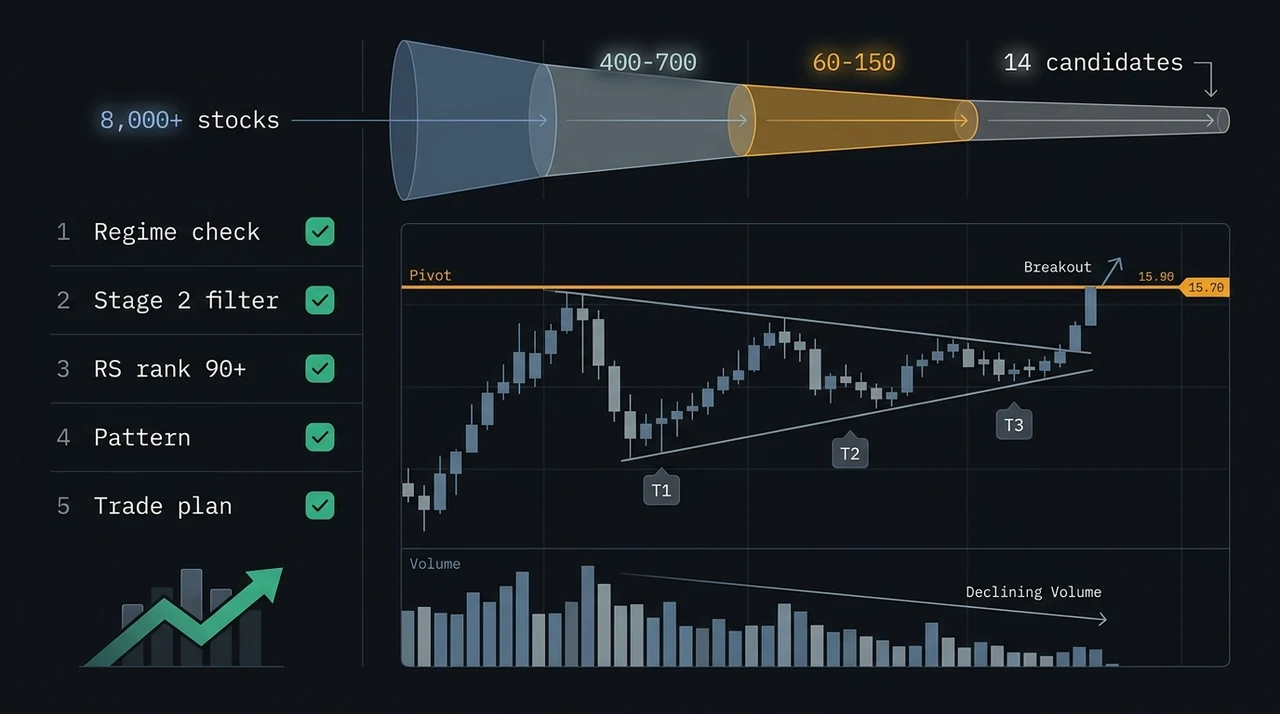
A well-built swing trading screen applies five filters in sequence. Each filter has a specific job — remove any one and false positives multiply. For the deep dive into why each filter matters and the research behind it, read the full filter breakdown.
| Criterion | What It Filters | Quick Reference |
|---|---|---|
| Moving average stack | EMA9 > EMA20 > SMA50 | Confirms Stage 2 uptrend |
| Relative strength rank | RS ≥ 70 (ideally 90+) | Identifies market leaders |
| Volume pattern | Contraction in base, expansion on breakout | Confirms institutional participation |
| Setup pattern | VCP, pullback, mean reversion, gap | Defines entry, stop, and target |
| Market regime | Trending Up, Ranging, Trending Down | Determines which strategies have edge |
The real question is not what to filter — it is how to apply these filters efficiently and interpret the results. That is where the screening workflow matters.
Strategy-Based Screening vs Raw Filter Screening
Raw filter mode screens by individual conditions. Strategy mode evaluates a full multi-condition checklist — trend, volume, momentum, and pattern proximity — and assigns a quality grade to each match. Use raw mode to explore; use strategy mode to trade.
Most screeners offer raw filters: price above X, RSI below Y, volume above Z. These are the building blocks of a screen, but they are not a strategy.
Raw filter screening generates results when individual conditions cross a threshold. A stock passes if RSI is below 40 AND price is above SMA50. It fails if either condition is not met. The result: lists of stocks that check some boxes but lack the full confluence a high-probability setup requires.
Strategy-based screening evaluates a complete setup thesis. Each named strategy has a multi-condition checklist — trend, volume, momentum, pattern proximity, RS rank — and assigns a grade based on how many conditions are satisfied. A Grade A setup has everything aligned. A Grade B setup is valid with minor caveats. A Grade C setup is technically present but weaker in some dimensions — worth adding to a watchlist, not immediately trading.
EasySwing's screener offers both modes. The thirteen strategies cover every major swing trading setup across bull, bear, and ranging markets:
- VCP Breakout — momentum breakout from tightening volatility contraction base
- Trend Pullback — entry in the EMA9/EMA20 zone in an established uptrend
- Cup and Handle — O'Neil's U-shaped base with shallow handle entry
- Qullamaggie Breakout — continuation breakout after a +30% prior leg, per Kristjan Kullamägi's methodology
- Swing Condor — range-bound, delta-neutral setup in low-volatility consolidations
- Bear Flag — short continuation after a sharp high-volume decline (short direction)
- RSI Overbought — short setup from an overbought bounce in a downtrend (short direction)
How to Build a Swing Trading Scan in Three Steps
Step 1 sets your universe by market cap and RS rank. Step 2 selects a strategy that matches the current market regime. Step 3 reviews the setup card — entry, stop, targets, and R-multiple — before committing. The process takes under 60 seconds.
Step 1: Set the universe boundaries. Start with market cap and RS rank. Small and mid-cap stocks ($200M to $20B) are where momentum effects are strongest — institutional coverage is thinner, pricing is less efficient. Set RS rank minimum to 70 for a broad scan, 90 for high-conviction setups only.
Step 2: Select a strategy that matches the current market regime. Check the regime first. If Trending Up, focus on VCP Breakout, Trend Pullback, and Cup and Handle at Grade B or higher. If Ranging, shift to Mean Reversion and RSI Overbought. If Trending Down, only Bear Flag and RSI Overbought have a positive expected value.
Mark Minervini, in Think and Trade Like a Champion (2017), wrote: "The market environment is the primary determinant of your success. Trade with the wind at your back, not against it." The screener enforces this: selecting a strategy automatically filters for setups that fit the current macro environment.
Step 3: Review the setup card, not just the ticker. Each result shows an entry price, stop loss, two profit targets, and an R-multiple. If the R-multiple is below 2:1, the setup does not meet the minimum reward-to-risk threshold. The setup card eliminates the manual calculation traders used to do in spreadsheets.
Reading the Results: Grades, Tags, and R-Multiples
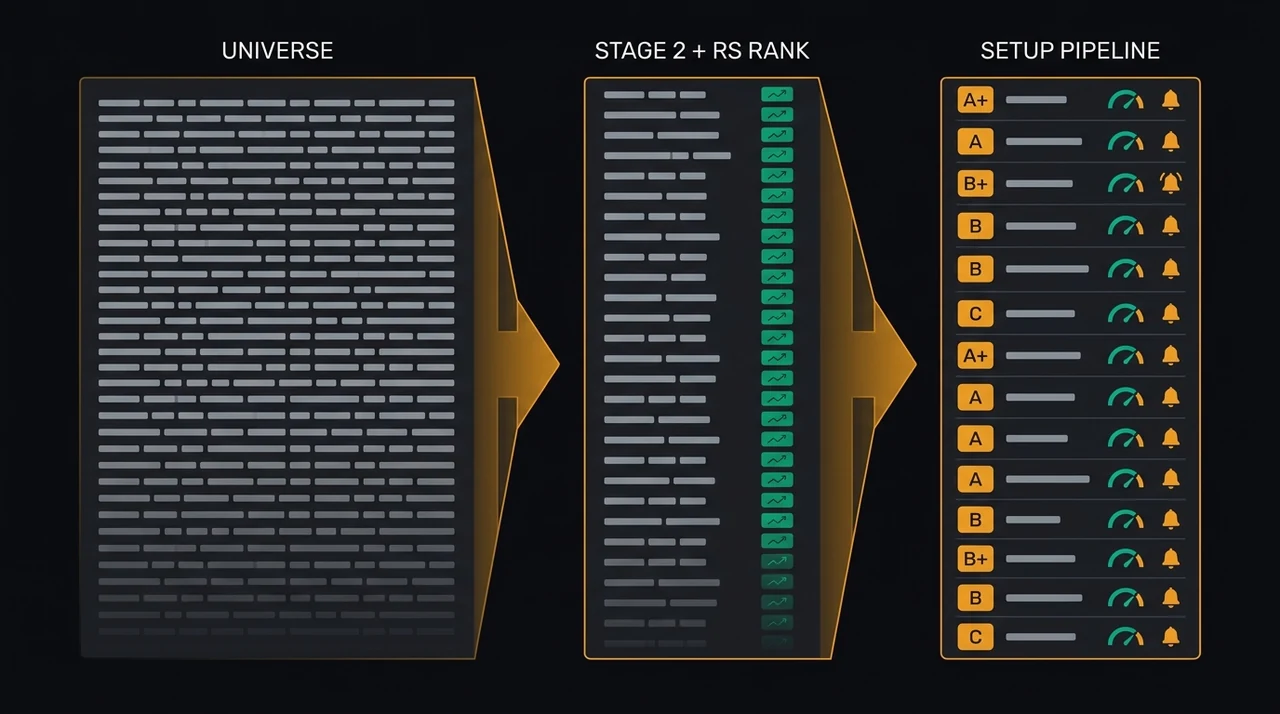
Setup tags identify individual technical conditions present on a stock. Strategy grades (A, B, C) rate the full setup's confluence. R-multiples translate the stop and target into a reward-to-risk ratio. All three layers are visible in every result row.
EasySwing's screener output has three signal layers, each adding context:
Setup tags are individual technical conditions active on a stock. A stock can carry multiple tags simultaneously: "S2" (Stage 2 confirmed), "VCP" (volatility contraction detected), "RS+" (RS rank above 90). Tags are the ingredients.
Strategy grade (A, B, C) is the recipe's quality score. Grade A means every condition in the strategy's checklist is met with strong confluence. Grade B means the setup is valid with minor caveats. Grade C means the pattern is present but some confluence factors are weaker — valid for watchlist tracking, not immediate entry.
R-multiple is the reward-to-risk ratio calculated from the entry price, stop loss, and target. A setup with a 2.5R target means for every dollar risked, the expected reward is $2.50. For the mechanics behind this calculation, see position sizing with R-multiples.
Results default to sorting by strategy score (highest confluence first). This surfaces the setups most worth your attention at the top.
Turning Screener Results into Swing Trading Alerts
Save any screen as an alert and EasySwing notifies you via Telegram when new stocks match your criteria — so you capture setups as they form, not after the fact.
A screener that runs once produces a snapshot. A screener integrated with an alert system notifies you when new setups emerge — as they emerge. From any active scan in EasySwing, click Save as Alert. Your filter settings transfer into the alert builder. When the enrichment pipeline runs — twice daily, at midday and after the close — the alert engine checks the full universe against your saved criteria. New matches trigger a Telegram notification with the symbol, setup grade, entry level, and a direct link to the full setup card.
Two alert modes mirror the screener's two modes: strategy alerts (notify when any stock achieves a specified grade on a specified strategy) and raw alerts (notify when custom filter conditions are met). Most swing traders use strategy alerts for core setups and raw alerts for watchlist monitoring.
Checklist: Before You Act on Any Screener Result
- ✅ Market regime is favorable for the selected strategy
- ✅ Stock is in Stage 2 (EMA9 > EMA20 > SMA50, all trending up)
- ✅ RS rank is 70 or above (90+ for high-conviction entries)
- ✅ Setup grade is A or B — not C
- ✅ Volume pattern confirms the setup (declining in base, expanding on breakout)
- ✅ R-multiple is 2:1 or better (reward at T1 is at least 2× the stop distance)
- ✅ Entry is within 5% of the defined entry level (not chasing after a gap)
- ❌ Do not enter if the regime is Transitioning or bearish for your strategy family
- ❌ Do not enter if the stock reports earnings within 48 hours
- ❌ Do not force entries — if two or more checklist items fail, the setup is not ready
Related Screening Guides
A few adjacent topics worth reading depending on your specific use case:
- AI Stock Screener for Swing Traders — how conversational, natural-language scanning compares to a traditional filter builder.
- Momentum Stock Screener — the 5 filters that isolate market leaders specifically, a narrower cut than the full strategy set covered here.
- Swing Trading Signals — how to distinguish a genuine high-probability signal from a screener result that merely clears a threshold.
- Day Trading Stock Screener — the filter differences when you shrink the hold period from days to hours.
Key Takeaways
- Strategy mode goes beyond raw filters by evaluating a full setup thesis and assigning A/B/C grades — use it for trading, use raw mode for exploring
- The three-step workflow (set universe, select strategy for regime, review setup card) takes under 60 seconds and eliminates the manual chart review bottleneck
- Setup tags are ingredients, strategy grades are the recipe score, R-multiples are the risk/reward math — all three layers visible in every result row
- Save any screen as a Telegram alert so you never miss a high-conviction setup as it forms
- For the research behind each filter, see 5 Swing Trading Screener Filters That Separate Signal from Noise
- Start broad (market cap + RS rank), then narrow by strategy and grade — over-filtering returns nothing worth trading
Frequently Asked Questions
What is the difference between strategy mode and raw filter mode in a stock screener?
Raw filter mode screens by individual conditions — price above X, RSI below Y, volume above Z. Strategy mode evaluates a full multi-condition checklist and assigns a quality grade (A+/A/B+/B/C) to each match. Use raw mode when exploring or building custom screens. Use strategy mode when you want a quality-filtered shortlist ready for manual confirmation.
How many stocks should a well-calibrated swing trading scan return?
A well-calibrated scan typically returns 5-25 stocks per run. More than 50 results usually means the filters are too loose — not every match can be reviewed thoroughly. Fewer than 3 results usually means the filters are too tight, or the current market regime does not support the selected strategy. Grade A setups are genuinely rare: expect 2-8 per scan in a favorable market regime.
Can I use Finviz or TradingView as a swing trading screener?
Finviz and TradingView apply basic filters — market cap, price range, moving average position — but cannot detect Stage 2 structure as a sequential test, compute RS rank relative to a live universe, or identify named patterns like VCP or bull flag consolidations. They are reasonable starting points for broad filtering, but lack the strategy grading and pattern detection that produce a ranked, actionable shortlist.
What does the R-multiple on a screener result mean?
The R-multiple is the reward-to-risk ratio calculated from the entry price, stop loss, and target. A setup showing 2.5R means for every dollar risked (distance from entry to stop), the expected reward is $2.50 (distance from entry to target). Most swing traders require a minimum of 2:1 R-multiple before considering an entry. For the full methodology, see the position sizing with R-multiples guide.
Should I act on every Grade A result from a stock screener?
No — Grade A means all technical criteria are aligned, but it is still a candidate, not an automatic buy signal. Always confirm with manual chart review: check for nearby earnings dates, verify the entry level has not already been passed, and ensure the position fits within your portfolio risk budget. The screener narrows the field; the trader makes the final call.
EasySwing screens for swing trading setups automatically across 2,000+ US equities twice each trading day. For the research behind each screener filter, read 5 Swing Trading Screener Filters That Separate Signal from Noise. For more on the strategies behind the screener, read the complete swing trading strategies guide. Learn how RS rank identifies the highest-conviction candidates. Scan results are for informational purposes only. See our Risk Disclaimer.
Disclaimer: This article is for educational purposes only and does not constitute investment advice. EasySwing is a stock screening tool, not a registered investment advisor. All trading involves risk. Read our full disclaimer →